Buyer web experience
Scope, offers, agreement and project record
Implemented web workflow
Oppmålt
Independent product development · In development
A renovation marketplace prototype that turns room measurements into an agreed scope, comparable quotes and a record of the work.
Quotes are difficult to compare when contractors allow for different quantities, assumptions or exclusions. Oppmålt starts with the work itself: describe the room, choose trades and materials, calculate quantities and establish a scope that contractors can review.
The main decisions are practical: what needs measuring, what a contractor can question, and how an agreed change updates the scope. I work out those rules and use AI-assisted development to implement and check them.
Follow the recorded example from measured scope to comparable offers and a demo agreement.
Recorded development screens · demonstration data
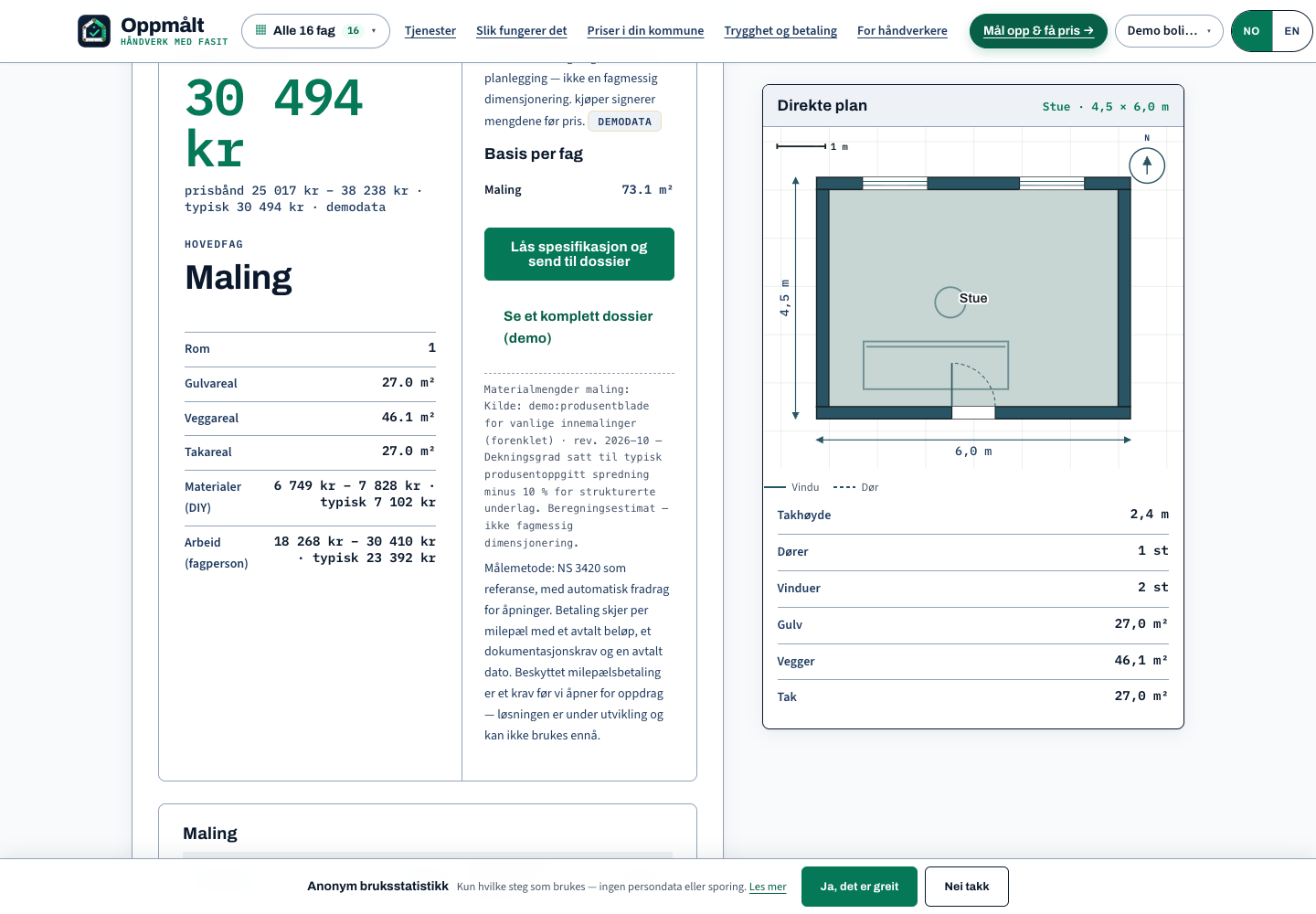
Room measurements establish the quantities and assumptions that offers will be based on.
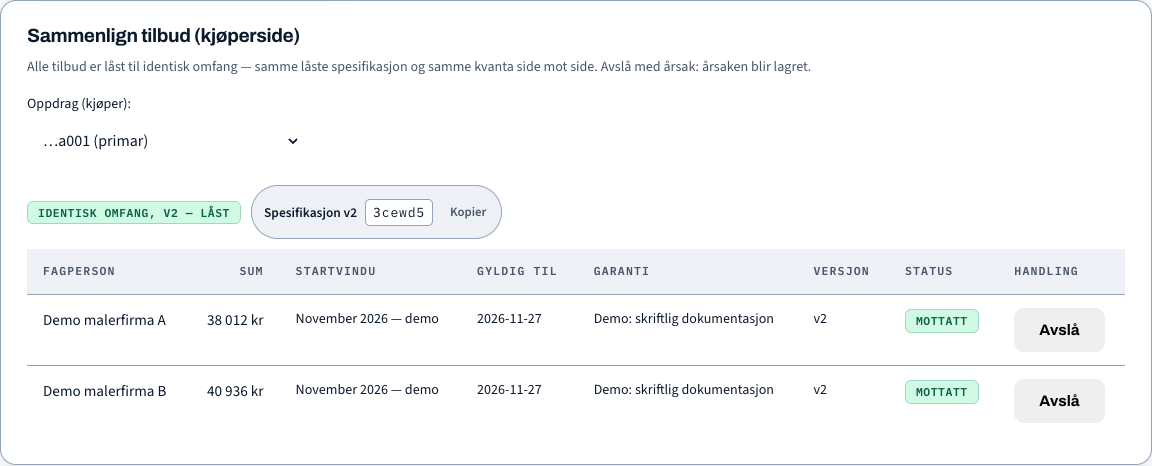
Check prices against the same specification version, so the basis for comparison stays visible.
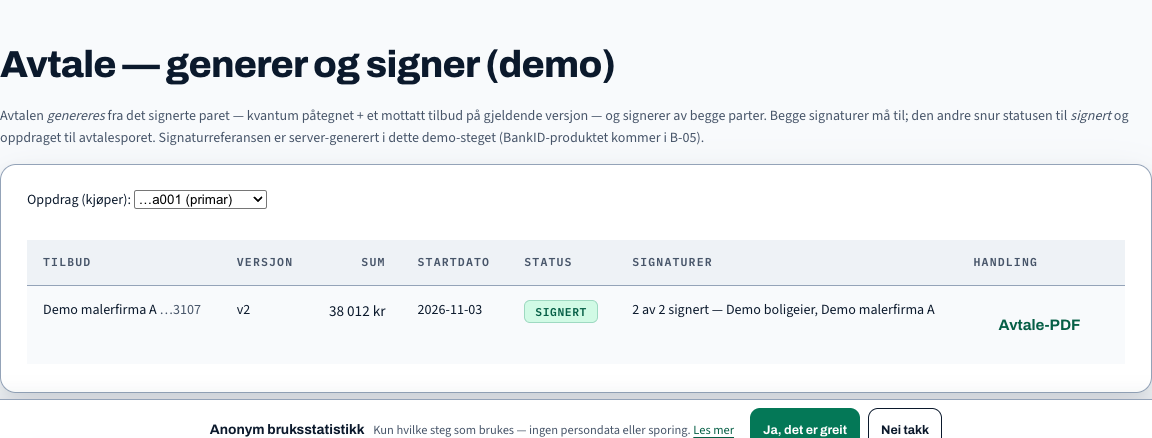
The accepted quote is linked to the recorded agreement. The signatures shown are development signatures.
Screenshots show the development build using demonstration data.
Scope, offers, agreement and project record
Implemented web workflow
Review scope, counter assumptions and prepare offers
Implemented contractor workflow
Supporting review, administration and onboarding
Supporting modules in development
The product connects homeowner and contractor workspaces with matching and brief distribution, scope revisions, version-bound quotes and agreements. Later modules cover photos, changes, completion checks, handover documents, reviews and complaints. Supporting administration handles contractor onboarding and approvals.
| Mode | Current status |
|---|---|
| Web product | Working prototype in development |
| Payments and signatures | Payment proposal and development signing; see the payment design and agreement screenshot |
| Local and hosted operation | The web service stores project records in PostgreSQL. These examples run locally; hosted operation and external storage are not established. |
| Application targets | Browser interfaces; no separate native desktop or phone client is implemented in this codebase. |
The design links agreed milestones, evidence of completed work and authorised release of funds. Homeowner acceptance, an authorised payout request and the provider’s confirmed payout remain separate events.
Proposed model: agree scope and milestones, fund the full contract, then release from that balance.
Release checks: confirmed funds, homeowner acceptance, authority, scope version, available amount and dispute restrictions. Silence is not acceptance.
Proposed design. Provider/legal arrangements and the complete funding-to-payout flow remain unconfirmed.
Accepted work is not a completed payout.
The intended model funds 100% of the agreed contract amount upfront through a suitable provider arrangement. Accepted milestones draw from that balance; the same agreed work is not charged again at each stage. The table shows what each party must do before accepted work can lead to payout.
| Dependency | Homeowner | Contractor | Oppmålt workflow | Payment provider |
|---|---|---|---|---|
| 1 Agree the contract | Agree scope version, price, milestones and acceptance conditions. | Agree the same terms. | Record the agreed version and conditions. | |
| 2 Initiate funding | Initiate funding of the full agreed contract amount. | Request funding through the proposed provider arrangement. | Process the funding request. | |
| 3 Confirm funding | Record the provider-confirmed funding status. The funded workflow is not ready while funding is incomplete. | Confirm funding status. A payment click or authorisation is not confirmed funds. | ||
| 4 Request milestone review | Complete the work and submit evidence tied to the agreed scope. | Receive the milestone request: “submit evidence”. | ||
| 5 Accept or return | Review evidence: “accept milestone”, or request correction / open a dispute. Silence is not acceptance. | Correct the work if requested. | Record the decision. A correction or dispute does not release the request automatically. | |
| 6 Check release eligibility | For an accepted request, check authority, scope version, eligibility, available amount and dispute restrictions. Acceptance alone is not payout. | |||
| 7 Request payout | Only if the checks pass: send a permitted “request payout” instruction. | Receive the permitted instruction. | ||
| 8 Confirm the outcome | Record and reconcile the actual provider outcome. Pending or failed is not paid. | Return “pending”, “failed” or “completed” status. | ||
| 9 Continue or complete | Review later work under the agreed conditions. | Submit later milestones or final completion evidence. | Use the remaining funded balance only under later-milestone and final-acceptance/inspection conditions. | Handle later permitted instructions under the provider arrangement. |
Proposed design, not a live escrow service or evidence of a provider partnership. The provider/legal arrangement and complete funding-to-payout implementation remain unconfirmed. Norway is the first intended market; Sweden and Denmark require separate readiness and provider/legal review.
Evidence starts a review. Acceptance permits checks. Only the provider confirms payout.
The central rule is to agree quantities and assumptions before comparing prices. A contractor can propose a clarification; accepting it creates a new scope version. Each quote keeps the version it prices, so a later revision cannot quietly change the basis of an earlier offer.
During execution, photos attach to work items after consent. Proposed changes go back to the buyer for a decision, and completion checks lead towards inspection and handover. These later modules have working implementation and controlled checks; payment remains a separate, unfinished connection.
The payment proposal follows the same logic: link the agreed work, supporting documents and authority to release money. Requiring more detail up front takes effort. It is intended to make later decisions clearer; savings and fewer disputes have not been measured.
Some buyer actions after sign-in and each contractor’s separate confirmation of quantities still need correction. Completion, handover and review modules have implementation and automated checks, but a paid project has not been demonstrated through completion. Optional photo assessment was switched off.
Employment contact · Oslo, Norway
For a conversation about a relevant role, contact me by email or LinkedIn.